Below are the general *ACL policies for preparing camera-ready papers. Please be advised that your conference may have some differences from what is listed in this document. If you are unsure, email your conference publication chairs.
- When and where do I send my final camera-ready paper?
- How should I enter my metadata?
- How should the final copy differ from the original submission?
- How long can it be?
- What’s the deal with including an Appendix? Do I include it as supplemental?
- What is the format for the camera-ready copy?
- How do I ensure that my file is correctly formatted?
- What if my paper includes graphics?
- What about copyright?
- What if my paper’s title or author list has changed?
- My question isn’t answered here…?
When and where do I send my final camera-ready paper?
You may submit the final version of your paper by navigating to your conference START login, e.g., https://www.softconf.com/naacl2019/papers and following the internal links. You should have received an email with more information about this procedure.
How should I enter metadata on the START system?
The metadata (title, author, abstract) that you enter into START is very important, because it is used on the conference website, handbook, mobile app, and the ACL Anthology (and propagates to Google Scholar, etc).
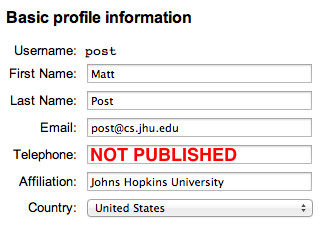
Before the metadata is entered, please have all authors ensure that the their name in their START profile (User Console → Update Profile) appears exactly the way that they want it to appear.
-
Unicode (UTF-8) can be used for accented or special characters.
-
Ordinarily, names are not written in all caps or all lowercase.
-
The “Last Name” is the name(s) by which your paper is to be cited. It is usually a family name, even for authors from cultures where the family name is written first.
-
The “First Name” is usually a given name or names, including middle names/initials.
The metadata should be written using Unicode (UTF-8) with LaTeX commands. Please try to follow these guidelines:
-
In titles, please capitalize the first word, the first word after a colon (
:), and all other words except the following “little words”: articles, prepositions, coordinating conjunctions, and the infinitive marker “to.” This includes hyphenated words likeMixed-Case. -
BibTeX (in many bibliography styles, including ACL’s) lowercases the titles of conference papers, and needs to be told which letters not to lowercase. So if your title has letters that should always be capitals, please protect them with curly braces, like this:
{E}nglish,{C}homsky,{IBM},{CFG}s,{HMM}s. Please also protect the first letter after a sentence-final punctuation mark. For example:Can {LSTM} {L}earn to {C}apture {A}greement? {T}he {C}ase of {B}asque Named {E}ntity {E}xtraction from {N}oisy {I}nput: {S}peech and {OCR}These curly braces will not appear in the online conference program or proceedings. They will only appear in the BibTeX file that others will use to cite your paper.
-
If you need literal curly braces, please escape them like this:
\{\} -
Please don’t use any nonstandard LaTeX commands, and there should be no
\footnotes or citations using\citeor related commands. -
You can use LaTeX math mode where appropriate:
An $O(n^2)$
Algorithm for $n$-gram Smoothing
. -
You can use Unicode (UTF-8) for accented or special characters.
-
If you copy-and-paste from your PDF file, please be sure to rejoin words broken by hyphenation.
How should the final copy differ from the original submission?
The camera-ready version of your paper should incorporate the comments of the reviewers as well as other changes you see fit to make. In addition, be sure to do all of the following:
- Ensure that your paper conforms to the provided styles, font and page size.
- Include the authors’ names and affiliations under the title.
- De-anonymize references to your own work in the body of the paper.
- Where appropriate, add acknowledgments for colleagues, reviewers, and grants. Do not number the Acknowledgements section. Please note that the acknowledgement section should fit within the allowed page limits and be in the same font as the rest of the paper.
- Ensure that all tables, graphs, and figures are readable at standard resolutions.
- If you have supplemental material (including written material, data, and/or code) ensure that all the components are put at the right place (see the Appendices and supplemental material section below for more details).
What are the tips to make my final version more accessible?
As a central venue of publication for our community, please prioritise the accessibility of your final version. The Diversity & Inclusion committee for ACL2020 has outlined some tips on how to do this: https://acl2020.org/blog/accessibility-for-camera-ready/
Where do appendices and supplemental material go?
Supplemental material can be divided into two types: appendices and non-readable supplemental material.
- Appendices are material that can be read, and include lemmas, formulas, proofs, and tables that are not critical to the reading and understanding of the paper. In your final camera-ready paper, appendices come after the references in the main paper and use the same two-column format as the rest of the paper (see the ACL 2020 style files for an example). Appendices do not count towards the page limit.
- Non-readable supplemental material (data, software, all other material) is uploaded separately.
How long can it be?
For both long and short papers, most *ACL conferences allow one extra page to help address reviewer comments. So long papers are permitted at most 9 pages of text while short papers may use up to 5 pages of text. Acknowledgements are included in these limits on pages of text. Please use the extra space to help address reviewer comments. For both long and short papers, there is no page limit for references or appendices. plus additional pages containing References, and Appendix.
If you are unsure about the page limit for the conference, please contact your conference publication chairs.
What is the format for the camera-ready copy?
The file must be in Portable Document Format (PDF) on A4 paper. We strongly recommend the use of ACL LaTeX style files (or Microsoft Word Style files) tailored for this year’s conference. You can view the style files and detailed formatting instructions on your conference website.
If you are using LaTeX, please create the PDF file with
pdflatex or xelatex. This ensures use of
the proper fonts and also takes advantage of other PDF
features. You will have the best results using a modern LaTeX
distribution, in particular,
TeX Live.
Using the geometry package to set the A4 format is recommended.
How do I ensure that my file is correctly formatted?
- Checking the paper size. Your paper needs to be formatted to
A4. Here are a
couple of ways to check this:
- Using pdfinfo. The `pdfinfo` command should include Page size: 595.276 x 841.89 pts in its output.
- Using Apple's Preview.app. Open the PDF, and type ⌘-I. It should report the correct page size.
- Using Adobe Acrobat. Open the PDF, navigate to File, Properties..., Description. The field labeled "Page Size" should read 8.27 × 11.69 inches in.
- Embedding Fonts. You can check your final PDF with the command
pdffonts mypaper.pdfand confirm that all the fonts say “yes” under “emb”. START will not let you upload your final PDF otherwise. If you are including graphics with the PDF extension, these files must also have embedded fonts. If your paper uses Asian fonts, they must be embedded in the PDF file so that they can be displayed by non-Asian versions of the PDF reader (Asian versions ship with a larger set of default fonts.)
What if my paper includes graphics?
Remember that you are providing a camera-ready copy. Thus, artwork and photos should be included directly in the paper in their final positions. Ideally, you should use vector graphic formats (PDF, EPS), which allow the graphics to scale arbitrarily. Avoid GIF or JPEG images that are low resolution or highly compressed.
Your paper must look good both when printed (A4 size) and when viewed onscreen as PDF (zoomable to any size, color okay). Thus, you may want to use color high-resolution graphics, allowing onscreen readers to zoom in on a graph and study it. However, please check that the same graph or photograph is legible when printed and in a PDF viewer at different resolutions. Don’t go overboard on resolution; keep file sizes manageable. Note that vector graphics (e.g., encapsulated PostScript) look good at any scale and take up little space (unless you are plotting many thousands of data points).
What about copyright?
When you submit the paper, you will be asked to sign the ACL Copyright Transfer Agreement on behalf of all authors, either electronically (via the START Conference Manager) or physically. Authors retain many rights under this agreement and it is appropriate in the vast majority of cases. Please contact the publication chairs with any concerns regarding copyright.
Before signing this form, please confirm with your co-authors (and, if applicable, your and their employers) that they authorize you to sign on their behalf. Please sign your full name (not just your first or last initials).
NAACL 2019 has its own new NAACL 2019 Copyright Transfer Agreement.
What if my paper’s title or other metadata has changed?
Then please edit those metadata fields when you upload the camera-ready version, so that they will appear correctly in the table of contents, author index, conference schedule, etc. Please also note that your name will appear in conference metadata as you have configured it in START, so make sure that it is correct there (e.g., capitalization, full name, etc). You can change this on user settings page of the START conference manager, under “User” → “Account Information” → “Update Profile”
Note: Your conference may or may not allow authors to be added or reordered after submission. Please check with your conference.
My question isn’t answered here…?
Please email the current publications chairs for any questions or clarifications. We will update this page if new issues arise.